
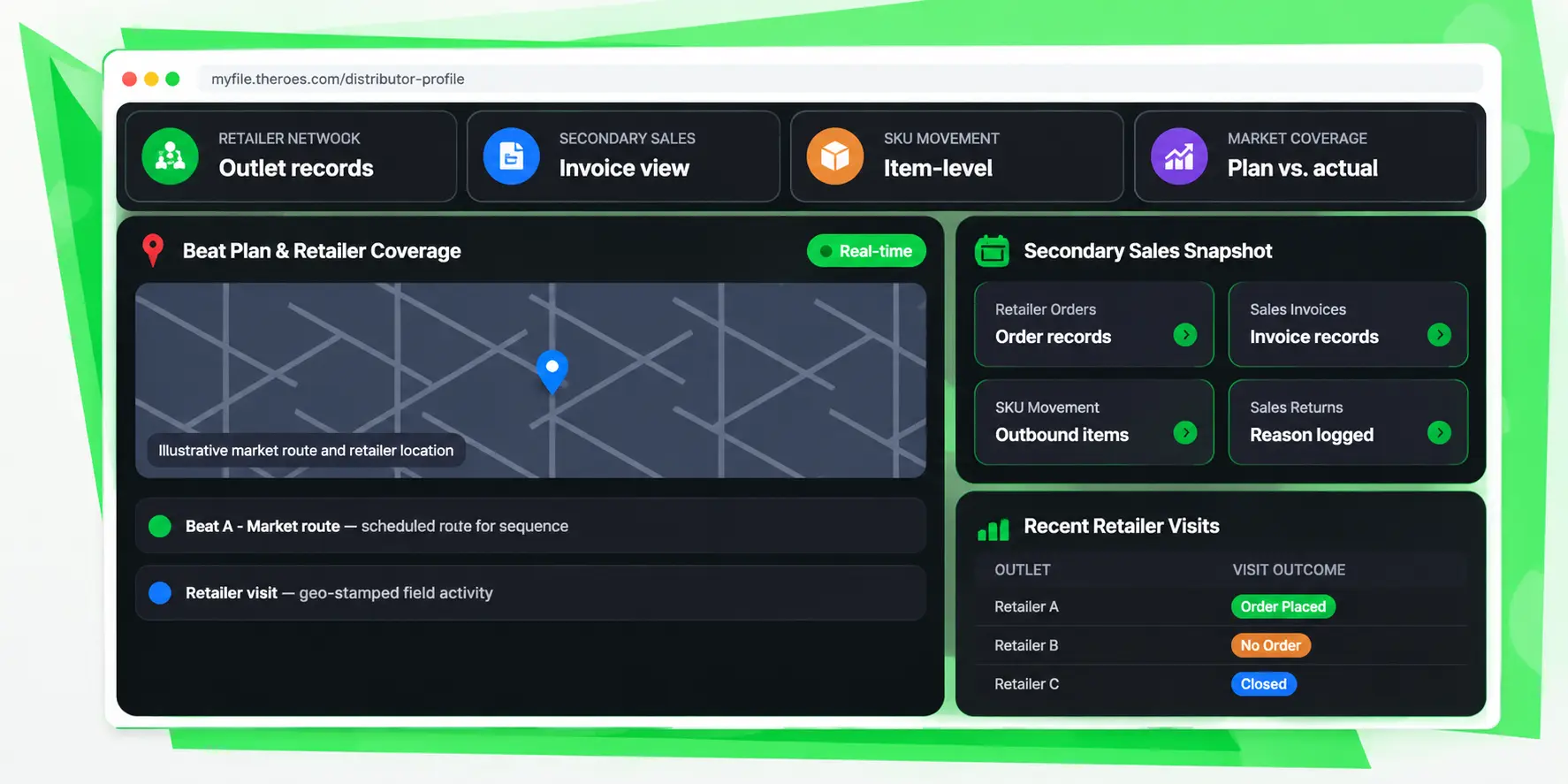
Retailer Network . Secondary Billing . Beat Plan & Market Coverage

retailer, sale and market visit. entire distributor network into focus.

Manage retailer records, capture distributor-to-retailer sales, track SKU movement and returns, and compare planned market coverage with actual field visits. MyFieldHeroes helps distribution teams build a clearer view of what is happening beyond the distributor.

A connected workflow from retailer records to market execution.

Outlet-level records
Retail
Invoice item movement
SKU
Planned route coverage
Beat
Actual visit records
GPS

The Secondary Sales Visibility Gap

You cannot improve market coverage if you cannot see what is happening at retailer level.

When retailer details, secondary invoices, product movement, returns and field visits are disconnected, sales leaders have an incomplete view of market execution. A retailer may be registered but never visited; a visit may happen without an order; and a return may affect sell-through visibility.

Retailer information is fragmented

Sales teams need a usable retailer directory with contact details, address, market or territory and active status. Missing or inconsistent retailer records make outlet-level planning and reporting harder.

Distributor-to-retailer sales lack visibility

Primary sales into a distributor do not by themselves explain which retailers purchased products. Retailer-level orders and invoices help capture the next stage of product movement.

Returns can distort the sales picture

Invoice, product, damage and expiry returns need to be recorded with a reason so teams can understand what came back and why.

A route plan does not prove a visit happened

A planned beat shows where a sales representative is expected to go. Actual check-in and check-out records, visit outcomes and location data help distinguish completed visits from missed or no-order visits.

The MyFieldHeroes Approach

Connect retailer records, secondary sales and field execution in one workflow.

MyFieldHeroes Secondary Sales Management helps distribution teams maintain a retailer database, record distributor-to-retailer sales and invoices, follow product movement and returns, and organise retailer coverage through beats. Planned retailer routes can be compared with geo-stamped field visits, including visits that do not result in an order.

A retailer database your team can work from

Maintain retailer names, contact people, phone and email details, addresses, coordinates, territory or market and active status. GST number can be recorded for registered retailers when that field is enabled.

Retailer-level sales and billing

Record sales from a distributor to a retailer through secondary orders and invoices, with invoice items representing SKU-level movement.

Coverage you can measure

Create named beats, assign retailers and visit days, define route sequence, and capture actual visits with check-in/check-out location, outcome and any resulting order.

The Distributor Data Challenge

Everything important about a distributor, organised in one place.

Build a structured retailer directory

Maintain retailer name, contact person, phone, email, address, latitude and longitude, territory and active status. Market alignment is represented through the territory hierarchy: a retailer's city-level or lower territory can identify the market associated with that outlet. Retailers do not need their own application login in the described workflow. Distributor sales representatives enter retailer transactions on the retailer's behalf. A GST number is relevant for retailers registered under GST; because many small kirana stores may be unregistered, the field should be optional/nullable if added to the retailer record.
Image description

Record distributor-to-retailer sales

Capture sales made by a distributor to a retailer through secondary orders and sales invoices. Invoice records and invoice line items provide a structured record of what was sold, while the linked order captures the sales transaction. This retailer-level billing record helps distinguish secondary sales to outlets from the distributor's own purchases from the manufacturer.
Image description

Follow product movement into retail

Use invoice line items to represent the products and quantities sold to retailers. The corresponding stock movement records capture outbound movement against the distributor-to-retailer invoice reference. This creates a traceable link between the secondary invoice and the SKU movement associated with that sale.
Image description

Record returns with a reason

Record retailer returns against the relevant return workflow and classify the reason, such as Damaged, Expired, Wrong Item, Quality Issue or Other. A full-invoice return can be represented as a return covering all invoice items; a product return can cover selected items. The return reason gives teams a more useful way to understand returned goods. Damage and expiry returns can be distinguished from wrong-item or quality-related cases.
Image description

Organise planned retailer coverage

Create named beats for a distributor and set the planned frequency, such as Daily, Alternate Days, Weekly, Fortnightly or Monthly. Assign retailers to each beat, specify the planned visit day and define the sequence in which outlets should be covered. The beat and retailer sequence represent the planned route, giving sales teams a defined structure for market coverage.
Image description

Compare the plan with actual field activity

Capture actual retailer visits through geo-stamped check-in and check-out records associated with the sales representative. Record the visit outcome as Order Placed, No Order, Closed or Not Visited, and optionally link a resulting order. Recording visits even when no order is placed is important: it helps distinguish a retailer that was visited but did not purchase from one that was not visited at all.
Image description

Understand purchasing, inactive and newly added retailers
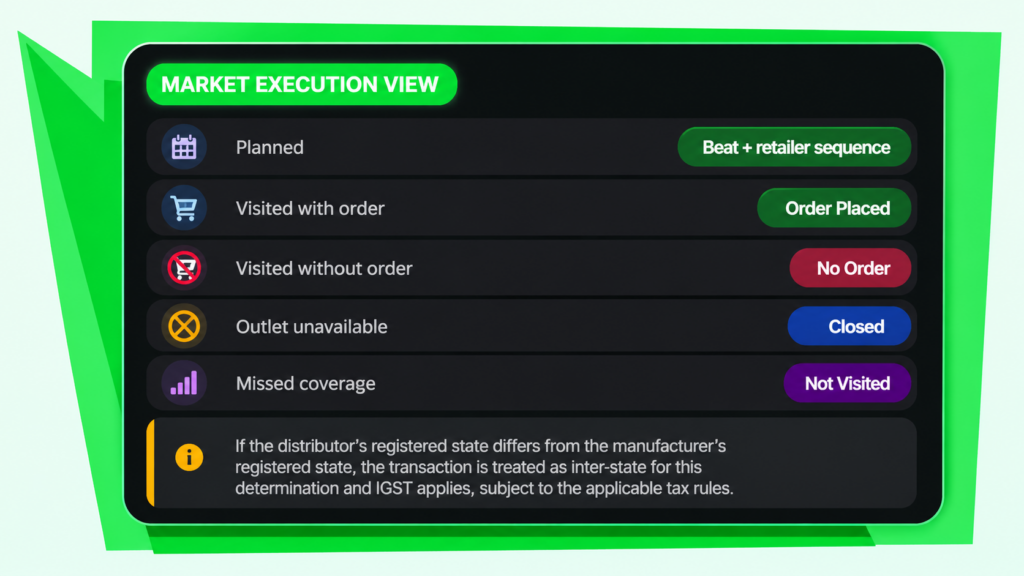
Use secondary order dates to identify retailers purchasing during a selected period, retailer creation dates to identify newly added outlets, and visit outcomes to identify inactive retailers. Visit records help distinguish outlets that were not visited from outlets that were visited but did not place an order. New retailer records can also be cross-referenced with beat assignments to understand whether newly registered outlets are being incorporated into planned routes.
Image description

GST-Aware Distributor Records

Connect distributor tax identity with the right invoicing context.

A distributor’s GST registration details are important beyond record keeping. The registered address state provides the source information used to determine whether a transaction is intra-state or inter-state when compared with the manufacturer’s registered state.

That state comparison determines the applicable tax treatment: CGST and SGST for intra-state transactions, or IGST for inter-state transactions. Maintaining the distributor’s GST and registered-address information gives the invoicing workflow the relevant source data for tax determination.

Keep the distributor’s legal entity name and registered address clear in the profile so teams can refer to the correct business identity during invoice preparation.

Market Coverage Reporting

Turn retailer and visit data into actionable market views.

The described data supports three practical report views. Combine retailer creation, secondary order dates, beat assignments and visit outcomes to understand outlet activity more clearly.

Retailers Purchasing

Identify retailers with distributor-to-retailer orders dated within the selected reporting period.

Inactive Retailers

Identify retailers with no Order Placed visit outcome over a configured number of periods. Visit records help distinguish never-visited outlets from outlets visited without a purchase.

New Retailers Added

Identify retailers created during the selected period and cross-reference them against beat assignments to see whether new outlets are included in planned routes.

Planned vs. Actual Coverage

Compare assigned beat retailers with actual geo-stamped visit outcomes to understand route execution and gaps in market coverage.

A Structured Onboarding Flow

From distributor details to a usable business profile.

Maintain the retailer record

Add outlet identity, contact details, location, territory/market and active status.

Plan market coverage

Create a beat, set frequency, assign retailers, visit days and route sequence.

Visit the retailer

Capture geo-stamped check-in/out, visit outcome and an order when applicable.

Record secondary billing

Create the retailer order and invoice with products and quantities sold.

Track movement and returns

Associate invoice items with outbound stock movement and record returns with a reason.

Review market coverage

Analyse purchasing, inactive and new retailers alongside planned beats and actual visits.

Questions people ask before Signing Up.

What is secondary sales management software?

Secondary sales management software helps businesses track sales made by distributors to retailers, beyond the manufacturer’s primary sale to the distributor. It can connect retailer records, orders, invoices, product movement, returns and field coverage.

What is the difference between primary sales and secondary sales?

Primary sales generally refer to sales from a manufacturer or supplier to a distributor. Secondary sales refer to sales from the distributor to retailers. Retailer-level orders and invoices help provide visibility into this next stage of distribution.

Do retailers need to log in to MyFieldHeroes?

No retailer login is required in the workflow described for this module. Distributor sales representatives record retailer transactions on the retailer’s behalf.

What retailer information can be maintained?

The retailer record includes name, contact person, phone, email, address, latitude and longitude, territory and active status. GST number is relevant for GST-registered retailers and is proposed as an optional field because some small retailers may be unregistered.

Can we create secondary sales invoices for retailers?

Yes. The described workflow supports distributor-to-retailer orders and sales invoices, with invoice items recording the products sold.

How is SKU movement tracked?

Retailer invoice items record the SKU-level sale, while associated stock movement records capture outbound movement against the distributor-to-retailer invoice reference.

Which types of sales returns can be recorded?

The return reasons available in the described design include Damaged, Expired, Wrong Item, Quality Issue and Other. A full-invoice return can cover all invoice items, while a product return can cover selected items.

What is a beat plan in secondary sales?

A beat plan is a named retailer route assigned to a distributor. It can define visit frequency, retailers on the route, planned visit day and the sequence in which outlets should be covered.

How does retailer visit tracking work?

A sales representative’s actual visit can be recorded with geo-stamped check-in and check-out details, a visit outcome and an optional link to the resulting order. Outcomes include Order Placed, No Order, Closed and Not Visited.

How can we identify inactive retailers?

Retailer visit records make it possible to identify outlets with no Order Placed outcome over a configured number of periods. Because visits can be recorded even when no order results, teams can distinguish a visited-but-no-purchase outlet from one that was not visited.

What market coverage reports are available from this data?

The described reporting use cases include retailers purchasing during a period, inactive retailers and new retailers added. New retailer records can also be checked against beat assignments to see whether they have been incorporated into planned routes.

Stop Managing Blind.

Start Leading with Data.

Book a 20-minute demo. We’ll show you exactly how MyFieldHeroes fits your workflow- whether you run 5 MRs or 500 field reps.

Secret Link