
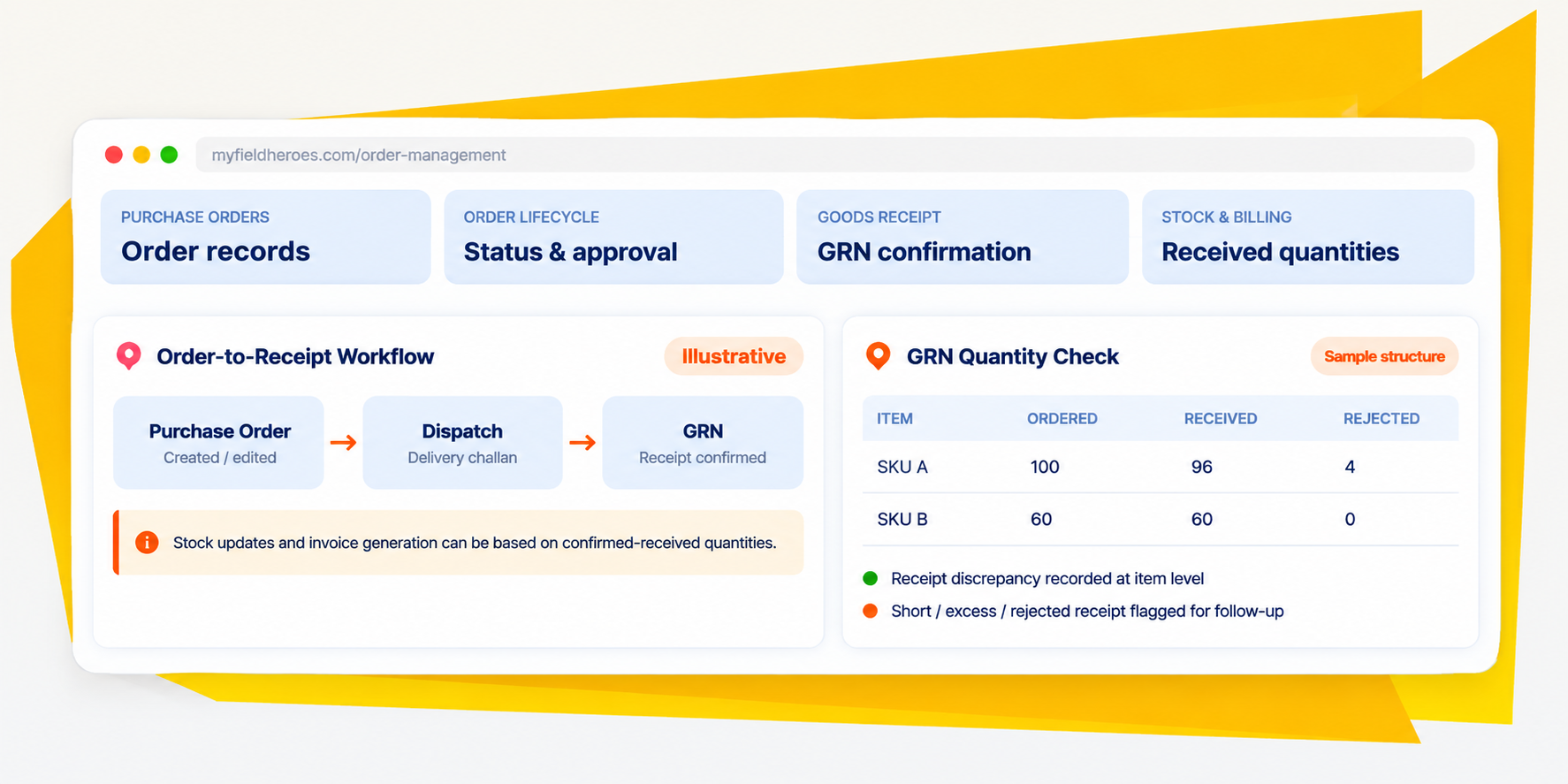
Distributor Purchase Orders . Order Tracking . Goods Receipt Notes
Order management software that connects every purchase order to what your distributor actually receives.
Create and manage distributor purchase orders, track order progress, repeat previous orders and confirm deliveries through structured Goods Receipt Notes. MyFieldHeroes connects order records with dispatch and receipt information, helping distribution teams maintain a clearer, more accountable order-to-cash workflow.
A structured trail across the distributor order and receipt lifecycle.
The Order Management Challenge
An order is not complete when it is placed. It is complete when the delivery is reconciled.
A purchase order may be created correctly and still leave important questions unanswered. Has it been confirmed? What has been dispatched? Did the distributor receive the full quantity? Were items short, rejected or delivered in excess? Without a structured link between order, dispatch and receipt, stock and invoice records can become difficult to reconcile.

Repeated orders take time to recreate
Recurring product requirements can mean entering similar order lines again and again. Rebuilding an order manually creates extra work and more opportunities for entry mistakes.

Order progress is split across stages
Order confirmation, approval and delivery milestones are not necessarily the same event. Teams need a clear view of each stage without confusing their separate records.

Dispatched does not always mean received
Shipments can arrive partially, include excess quantities or contain goods that must be rejected. Dispatch records alone do not establish what entered distributor stock.
Receipt differences affect reconciliation
When ordered, received and rejected quantities are not compared at item level, claims, returns, stock updates and invoices can be harder to validate.
The MyFieldHeroes Approach
Connect purchase orders, delivery milestones and confirmed goods receipt.
MyFieldHeroes Order Management creates a structured trail from distributor order creation through dispatch tracking and distributor-side GRN confirmation. Teams can see what was requested, follow operational milestones and record the quantities actually received before stock and invoice actions.

Purchase orders with control
Create distributor orders, edit them while in Draft, cancel when needed and retain item-level tax breakdowns.

Repeat orders with traceability
Clone an earlier order or repeat the last order while keeping a source-order relationship for audit.

Receipt-led stock and billing
Confirm actual quantities through a GRN, then align distributor stock and invoice generation with what was received.
Order Management Features
Create, review and manage distributor purchase orders.
Turn a previous order into a faster starting point.
Follow order, approval and delivery milestones separately.
Confirm what arrived—not just what left the warehouse.
Give short, excess and rejected quantities a defined path.
Base stock updates and billing on confirmed receipt quantities.
Operational Outcomes
More confidence in every order and every received quantity.

Less repeat order entry
Use previous orders as a starting point instead of rebuilding familiar line items.

Clearer order audit trail
Retain the source-order relationship for cloned orders and repeat purchases.

Better receipt reconciliation
Compare ordered, received and rejected quantities for each GRN item.

More reliable stock and billing basis
Align distributor stock updates and invoice generation with confirmed receipt quantities.
Questions people ask before Signing Up.
It helps manage purchase orders and their line items, track order progress, record dispatch milestones and reconcile what was actually received. MyFieldHeroes connects these steps with distributor-side Goods Receipt Notes.
In the described workflow, a purchase order can be edited while its status is Draft. The order status model also includes Confirmed, PartiallyDispatched, Dispatched and Cancelled.
Yes. An order can be cloned using a source-order relationship. This can support a “Repeat Last Order” action while preserving lineage to the original order.
Order progress uses Draft, Confirmed, PartiallyDispatched, Dispatched and Cancelled. Approval is represented separately through approvalStatus, and packed or shipped progress is tracked through delivery_challans.status.
A GRN is the distributor’s confirmation of goods actually received against an order. It records receipt type and item-level ordered, received and rejected quantities, with a rejection reason where relevant.
The GRN design includes Full, Partial, Rejected, Short and Excess receipt types. Rejected quantity is not added to distributor stock and can feed a return workflow.
The difference between ordered and received quantities identifies a short receipt. The workflow can trigger a Transport or Damage claim, depending on the discrepancy.
GRN confirmation is the trigger point for increasing distributor stock and stock batches. Invoices can be generated against confirmed-received quantities, helping avoid billing for goods the distributor did not receive.
An excess receipt is flagged for manufacturer reconciliation because it may indicate an over-dispatch. The final reconciliation process depends on the configured business workflow.
No. The supplied design represents approval through approvalStatus and packed or shipped milestones through delivery challan status, separately from the order status.