

Best in class Field Expense Management

Expense claims submitted from the field. Approved in one tap paid in days.

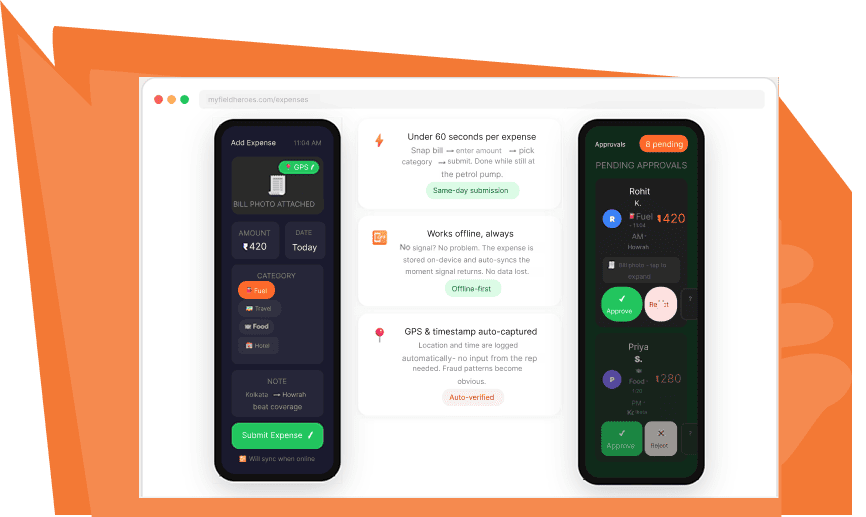
Field reps snap a photo of the bill, enter the amount and category,and submit-right from where they are. Managers approve from their phone in seconds. The month-end expense scramble becomes a thing of the past.

The monthly expense ritual nobody enjoys

It’s the 28th of the month. Your field reps frantically collecting receipts they lost three weeks ago.

They're filling out expense forms in 15 minutes that should have been updated daily. Your accounts team is decoding handwritten amounts on crumpled thermal paper. Your managers are approving claims without really knowing whether they're legitimate. Someone's claim gets lost. Someone else's payout takes another 45 days.

Your best field rep starts considering a job change because he’s owed ₹18,000 and nobody can tell him when he’ll see it.

Every single business with a field team has this exact cycle. It wastes hours of accounting time every month, demoralises good employees, and creates opportunities for expense fraud you'll never catch.

Day 1

Expense hppens. Rep thiks “i will log it tonight.”

Day 7

“I’ll add it all together at week-end.” Receipt in glove box.

Day 21

Receipt crumpled. Amount forgotten. Thermal paper faded.

Day 28

Panic. guesswork.-days payout cycle begins.

Three steps. Under a minute per expense.

From the petrol pump to the manager’s approval queue-in under 60 seconds.

Snap the bill enter the amount

Right after the expense happens - at the petrol pump, at the dhaba, at the hotel the field rep opens MyFieldHeroes, taps "Add Expense", takes a photo of the bill, enters the amount, and picks a category. GPS location and timestamp are captured automatically.

Auto-sync or work offline

If there's network, the expense uploads immediately. If not, it's stored securely on the device until sync is possible. Either way, the rep gets a confirmation and moves on. No more "I ll add it tonight" that turns into "I've lost the receipt."

Manager approves with one tap

Every expense submitted lands in the manager's approval queue. The manager sees the bill photo, amount, category, GPS location, timestamp, and the submitting rep - all on one screen. Tap approve. Done. The whole process can happen the same day.

Why we don’t auto read bill amounts.

A lot of expense apps claim to read bill amounts automatically using OCR or Al. The idea sounds good-snap a photo, the app pulls out the amount, no manual entry needed. In theory, it saves the field rep 10 seconds. In practice, it creates two problems much worse than the 10 seconds saved.

First, OCR is unreliable on Indian bills. Thermal paper fades. Handwritten totals get misread. Hotel bills have VAT, service charges, and tips that confuse auto-readers. The “convenient” auto-read ends up wrong 15-30% of the time, which means finance has to check every claim anyway. Second, OCR requires cloud processing, which silently fails when your rep is offline. MyFieldHeroes takes a different approach: the rep enters the amount themselves, next to the photo. It takes 5 extra seconds, works 100% of the time, and works perfectly offline.

Manual entry next to photo = the rep commits to an amount they can be held to. Once an expense is approved on manual entry, there's no "the OCR misread it" defence. Clean. Auditable. Disputes are rare.

Everything expense management actual needs

Photo-attached submissions

Every expense includes a clear photo of the bill. Attached, timestamped, GPS-tagged, and stored securely. Finance teams never have to ask "where s the original?"

Pre-configured expense categories

Set up your expense categories once (Fuel, Travel, Food, Accommodation, Client Entertainment, or custom). Field reps pick from the list - no typos, no "Misc" black holes, clean reports.

Full offline support

Expenses can be captured and submitted without any network. The entry, photo, amount, category, and notes are all stored on the device and auto-sync the moment signal is available.

One tap manager approvals

Managers approve from their phone in seconds. Bulk approvals for trusted reps. Single-click rejections with a note. Designed to take minutes per week, not hours.

GPS + timestamp verification

Every expense is auto-tagged with the location and time it was submitted. If someone submits a "client dinner in Hyderabad" expense from home at midnight, the data tells you. Fraud patterns become visible.

Expense report by rep, category & period

Slice expense data however finance needs it. Download monthly reports, category breakdowns, per-rep totals, and period comparisons. Integration-ready exports for your accounting system.

The approval experience manager don’t hate.

Most expense approval workflows are built by people who’ve never approved an expense in their life. You log into a separate portal. You click into each claim. You squint at a thumbnail. It takes 45 minutes to clear a week’s worth of claims – and managers end up batch-approving everything unchecked just to get it over with. That’s exactly how expense fraud slips through.

MyFieldHeroes redesigned the entire approval flow around one insight: managers need to approve expenses quickly and on their phones, in the gaps between field calls. So we built an approval queue that shows every pending expense on one screen, with the bill photo full-size on tap, and single-swipe approve/reject.


A manager can clear 20 expenses in two minutes – with actual attention paid to each one. The bill photo is always visible. The GPS location is always there. The amount the rep entered is always right next to the original bill. Everything needed to make a real decision is on one screen.

2 mins to clear 20 expense approvals

4-5 days submission to payout vs. 35-45 days before

48 hours expense data ready after submission

0 separate portals or logins needed

Customer Stories

Real-world success stories showcasing

How our solution Solves client challenges.

When it comes to barbequing, there are two main schools of thought for the techniques that you can use. Freshly eggs with applewood smoked bacon - are amazing!

Albert Wilson

,,

mornings of spring which I enjoy with my whole heart. I am alone and feel the charm of existence in this spot mornings of spring which I enjoy.

Sarah Anderson

,,

When it comes to barbequing, there are two main schools of thought for the techniques that you can use. Freshly eggs with applewood smoked bacon - are amazing!

Walter smith

,,

Questions people ask before Signing Up.

Why doesn't MyFieldHeroes auto-read the bill amount from the photo?

We tried building OCR for Indian bills and it wasn’t reliable enough — thermal receipts fade, handwritten totals get misread, and complex bills with multiple tax lines confuse the reader. Since the finance team has to verify every claim anyway, we chose to keep amount entry manual and fast (5 seconds) rather than slow and unreliable. Manual entry also works perfectly offline, which is critical for rural field teams.

Can expenses be submitted offline?

Yes. MyFieldHeroes is offline-first across every feature, including expense management. Field reps can capture the bill photo, enter the amount, pick the category, and submit — all without any network connection. The expense is stored securely on the device and auto-syncs the moment the phone reconnects. No data is ever lost.

Can we set up approval hierarchies — like manager first, then finance?

Yes. You can configure approval workflows per team, per category, or per amount threshold. Small expenses might go straight from rep to finance; large expenses can route through the direct manager first, then an area head, then finance. We set this up during onboarding based on your policies.

Can MyFieldHeroes integrate with our accounting software?

Approved expense data can be exported in common formats (CSV, Excel) that work with most accounting systems. For direct integrations with specific platforms, our team handles the setup during onboarding based on your accounting stack.

How do we prevent expense fraud with manual amount entry?

Three things work together. First, every expense includes a photo of the original bill — the manager sees both the entered amount and the photo side by side, so any mismatch is caught instantly. Second, GPS and timestamp are auto-captured, so “dinner with client in Mumbai” submitted from a home address in Pune gets flagged visually. Third, reports surface outliers — unusual amounts, unusual frequencies, unusual locations — so patterns become obvious without anyone having to hunt for them.

End the month-end expense scramble.

Book a 20-minute demo. We’ll walk you through the submission flow, the approval queue, and the reporting — using your actual expense categories and approval policy.